

太长不看版本 #
-
把PL1配置到TDP以下,咱的设备TDP是15w,考虑到续航所以咱调整到了12.5W。
echo 12500000 > /sys/class/powercap/intel-rapl:0/constraint_0_power_limit_uw
-
温度过高时自动切换profile。
-
~/.c/s/user ➜ cat /home/with9/my_shell/smalltools/toggle_performance.fish
#!/usr/bin/fish

set temp (math max (cat /sys/class/thermal/thermal_zon*/temp|string join ','))
set profile (surface profile get)
set load (cut -d ' ' -f 1 /proc/loadavg)
set high_load (math $load \>= 7.6)
if test $profile = 'performance'
  exit
end
if test $temp -ge 74000 || test $high_load -eq 1
  sudo surface profile set performance #需要sudo里面配置上nopasswd surface 'NOPASSWD: /usr/bin/surface'
  notify-send "performance profile toggled"
end
----------------------------------------
~/.c/s/user ➜ cat auto-profile.service
[Unit]
Description=Auto Switch Surface Performance Profile on High Temperature

[Service]
Type=oneshot
ExecStart=fish -c /home/with9/my_shell/smalltools/toggle_performance.fish
----------------------------------------
~/.c/s/user ➜ cat auto-profile.timer
[Unit]
Description=Run auto-profile every 5 seconds

[Timer]
OnBootSec=10s
OnUnitActiveSec=5s
Unit=auto-profile.service

[Install]
WantedBy=timers.target
-
碎碎念版 #
问题描述及thermald尝试 #
在使用 Surface + Linux 的过程中,有一个问题困扰了咱非常久:看视频、玩游戏玩得好好的,CPU 会突然跌到 200 MHz,同时风扇瞬间飙到最大转速。 第一反应当然是散热问题,但问题是:
- 日常使用负载并不高,不至于看个视频就达到瓶颈吧?
- 风扇无法直接控制,只能靠切换
surface-profile来改变风扇敏感度。 - 切到
performance虽然能有一定缓解,但仍然会频繁触发这种极端降频。
查阅多条相关 issue 后,
发现不少人推荐使用 thermald。于是咱开始调节 thermald 的配置,把控温点设为 65°C,降温设备顺序设置为:intel_pstate -> cpufreq -> rapl_controller,确实改善了些,不再那么容易触发硬件保护了。
cat /etc/thermald/thermal-conf.xml
----------------------------------------
<?xml version="1.0"?>
<ThermalConfiguration>
  <Platform>
    <Name>Override CPU default passive</Name>
    <ProductName>*</ProductName>
    <Preference>QUIET</Preference>
    <ThermalZones>
      <ThermalZone>
        <Type>cpu</Type>
        <TripPoints>
          <TripPoint>
            <Temperature>65000</Temperature>
            <type>passive</type>
          </TripPoint>
        </TripPoints>
      </ThermalZone>
    </ThermalZones>
  </Platform>
</ThermalConfiguration>
cat /etc/thermald/thermal-cpu-cdev-order.xml
----------------------------------------
<CoolingDeviceOrder>
  <CoolingDevice>intel_pstate</CoolingDevice>
  <CoolingDevice>cpufreq</CoolingDevice>
  <CoolingDevice>rapl_controller</CoolingDevice>
  <CoolingDevice>intel_powerclamp</CoolingDevice>
  <CoolingDevice>Processor</CoolingDevice>
</CoolingDeviceOrder>
但新问题出现了:看个视频 / 玩个小游戏就容易掉到 400 MHz,体验依旧难受。如果调高温度又容易触发过保护。thermald 是被动降温,温度设置的过高的话就来不及反应了。尝试过 thermald 的 active 和 max 模式,效果更糟…
PL1&TDP #
直到有一天,在 issues 里看到一个
讨论,虽然该 issue 和咱的情景关系不是很大, 但是他们提到的 PL1、PL2、TDP 这些值给了咱思路, 经过检索发现
Intel 官方是推荐把PL1(长时功率)设置为 TDP(Thermal Design Power, 长时能稳定散掉的热量) 的, 于是咱去 一年半没有打开的 Windows 下查看了下这些值, PL1=11.25W, TDP=15W, PL2=61W, 可能是为了续航, 所以配置上 PL1 比 TDP 要低一点,Linux 下的 PL1 值就有点离谱了,被设置为了 25W 。
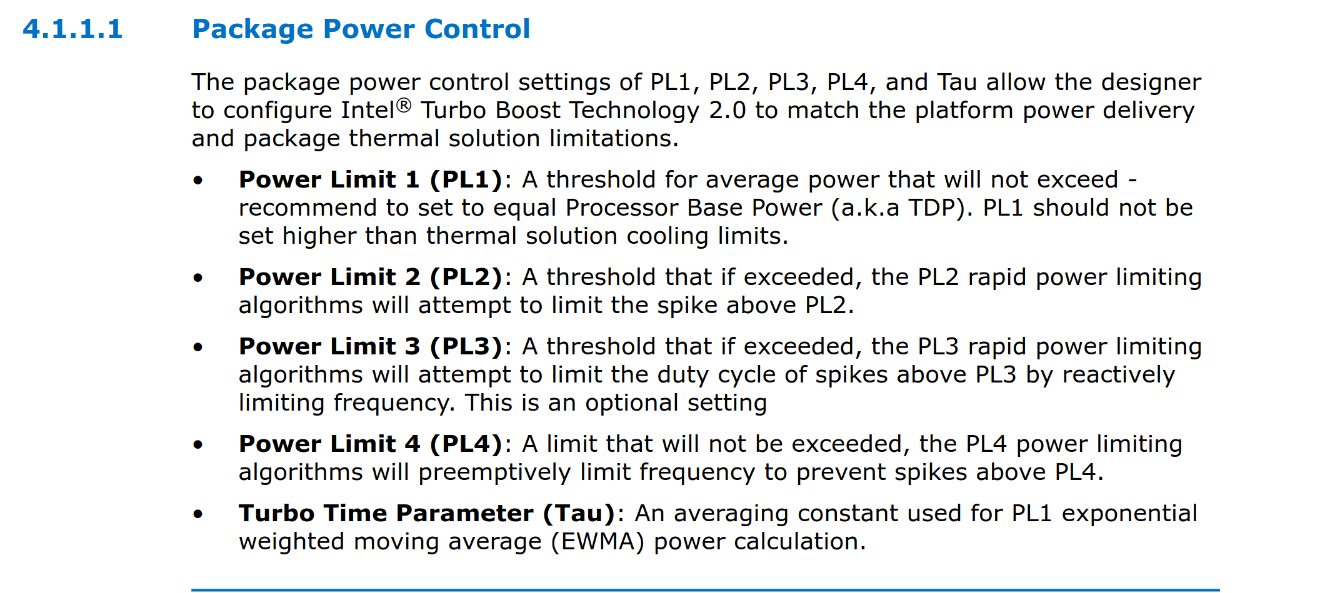
所以极端降频问题的本质似乎是:设备的默认 PL1 被设置的远高于 CPU 的 TDP。长时功率跑得太高 → 风扇跟不上 → 温度持续高位 → 超过固件“保守阈值” → 触发硬件保护 → 降频到200 MHz,在咱把 PL1 调回 TDP 后,卸载 thermald 后跑 stress 也不会触发保护了。Surface 固件本身似乎非常保守,根据咱的测试估计:温度在 80°C 左右长期不下降,就会触发这类安全机制,并不是要到理论的 100°C 才会触发。
#!/usr/bin/fish
echo 12500000 > /sys/class/powercap/intel-rapl:0/constraint_0_power_limit_uw
虽然 PL1 调整后已经非常稳定,但在极端任务下仍会偶尔触发降频。实际观察后发现这种情况在 performance profile 下很少出现。于是咱写了一个小脚本用来实时监控温度,超过 74°C 或者 CPU 负载很高的时候就切换到 performance,自动切回来可能导致短时间的频繁切换, 所以还是任务完成后手动切换比较合适。
#!/usr/bin/fish

set temp (math max (cat /sys/class/thermal/thermal_zon*/temp|string join ','))
set profile (surface profile get)
set load (cut -d ' ' -f 1 /proc/loadavg)
set high_load (math $load \>= 7.6)
if test $profile = 'performance'
  exit
end
if test $temp -ge 74000 || test $high_load -eq 1
  sudo surface profile set performance #需要sudo里面配置上nopasswd surface 'NOPASSWD: /usr/bin/surface'
  notify-send "performance profile toggled"
end
把此脚本加入定时器即可。
~/.c/s/user ➜ cat auto-profile.service
[Unit]
Description=Auto Switch Surface Performance Profile on High Temperature

[Service]
Type=oneshot
ExecStart=fish /home/with9/my_shell/smalltools/toggle_performance.fish
~/.c/s/user ➜ cat auto-profile.timer
[Unit]
Description=Run auto-profile every 5 seconds

[Timer]
OnBootSec=10s
OnUnitActiveSec=5s
Unit=auto-profile.service

[Install]
WantedBy=timers.target
现在的配置情况下终于可以流畅的同时看9个视频了(下次有时间讲一下怎么用
hyprscroller同时切换看n个视频:)

PS: 各大厂商开始军备竞赛, 疯狂把默认 PL1 调高,以抬高跑分、短时性能,但散热却没有跟上。轻薄本的散热本就偏弱,默认 PL1 又调得很激进,Linux 下缺乏厂商校准,触发诡异降频其实是必然。
参考资料 #
[1]:
https://github.com/linux-surface/linux-surface/issues/221
[2]:
https://github.com/linux-surface/kernel/issues/117#issuecomment-1061504400
[3]:
https://community.intel.com/t5/Mobile-and-Desktop-Processors/PL1-and-PL2/m-p/1649216
[4]:
https://www.techpowerup.com/forums/threads/i5-10300h-default-tpl-values-concern.294327/